What the Batch PDF Merger & Stamper Does
The Batch PDF Merger & Stamper is the flagship module of the Maharaja PDF Editor — and the feature that was born directly out of our parent company's real-world logistics operation. When Maharaja Trading was processing 3,000+ customs declarations weekly across 40+ countries, their document team was manually combining PDFs one by one, wasting entire workdays on a task that software should handle automatically.
The Batch Merger was built to eliminate that. Today it powers document operations for freight forwarders, customs brokers, 3PL providers, and major importers processing millions of pages monthly.
Intelligent Merge Engine
Our merge engine preserves PDF internal structure: bookmarks, named destinations, form fields, embedded attachments, and metadata. Unlike basic merge tools that flatten everything, Maharaja Batch Merger maintains document fidelity for customs audits.
Enterprise Stamp Library
Upload your own PNG or SVG stamp assets — corporate seals, approval marks, customs codes — and save them to a reusable library. Apply any stamp to a single page, a page range, or every page across all 500 documents in the batch simultaneously.
Visual Drag-and-Drop Reorder
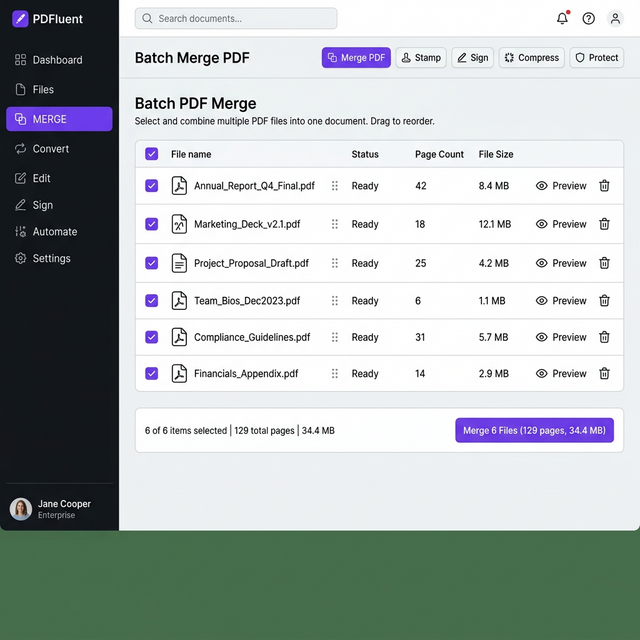
Before committing to the merge, visually reorder your documents using PDF thumbnail previews. Arrange packing lists before invoices, certificates before declarations — exactly the submission order your customs authority or freight portal requires.
Real-Time Processing Status
Monitor your batch merge in real time with per-document progress indicators, estimated completion time, and an error log for any corrupted or password-protected files. Download completed files while the rest of the batch continues processing.
Technical Specifications & Processing Speed
The Maharaja Batch Merger is engineered on a distributed cloud processing architecture with horizontal scaling — meaning performance remains consistent whether you submit 5 or 500 PDFs simultaneously.
| Specification | Starter | Logistics Pro | Global Enterprise |
|---|---|---|---|
| Max files per single batch merge | 50 PDFs | 250 PDFs | Unlimited (tested to 500+) |
| Max individual file size | 100 MB | 500 MB | No limit (2 GB+ tested) |
| Max total batch size | 1 GB | 5 GB | 50+ GB |
| Avg. merge speed (100-page docs) | ~4 docs/sec | ~12 docs/sec | ~25 docs/sec (parallelized) |
| Batch of 250 docs (avg 10 pages) | ~62 seconds | ~21 seconds | ~10 seconds |
| Custom stamp library slots | 3 stamps | 20 stamps | Unlimited |
| Batch stamp application | Manual (one doc at a time) | Batch (all docs) | Batch with rule-based automation |
| Supported input formats | PDF 1.0–2.0, PDF/A-1b, PDF/A-2b, PDF Portfolio, XFA Forms, Encrypted PDFs (with password) | ||
| Output format | Merged PDF, PDF/A-1b (archival), Structured ZIP (individual stamped files) | ||
| Encryption standard (at rest) | AES-256 (identical to US banking standards) | ||
| API access for automation | Not included | 1,000 API calls/day | Unlimited API calls |
| Uptime SLA | Best effort | 99.5% | 99.9% (contractual) |
Compliance & Regulatory Information
The Batch PDF Merger is designed to meet the stringent document integrity and data security requirements of international trade compliance frameworks. Below are the specific standards and regulations our infrastructure adheres to.
US Electronic Signature
Any stamps or electronic signatures applied via the Maharaja PDF Editor are compliant with the US Electronic Signatures in Global and National Commerce (ESIGN) Act and UETA — legally binding in all 50 states.
Data Privacy
All uploaded documents and processed outputs are handled under our CCPA (California) and GDPR (EU) compliant data processing agreement. Files are purged after 30 days unless explicitly retained. Users may request immediate deletion.
Information Security
Our cloud infrastructure operates within SOC 2 Type II certified data centers. Information security management practices follow ISO 27001 framework guidelines, ensuring physical, logical, and organizational data security controls.
Long-Term Document Archival
The Batch Merger can output in PDF/A-1b and PDF/A-2b archival formats — required by many trade finance institutions, insurance carriers, and government customs archives for long-term document retention mandates.
How to Use the Batch PDF Merger & Stamper
Navigate to the Batch Merger module from your Maharaja PDF Editor dashboard. Use the drag-and-drop upload zone to add your documents — drag directly from your Windows Explorer, Mac Finder, Google Drive (via our cloud connector), or SharePoint. You can upload all file types simultaneously: commercial invoices, packing lists, certificates of origin, HS code classification sheets, and bills of lading.
The uploader will display a thumbnail preview and page count for each document as it uploads. Any encrypted or corrupted files will be flagged immediately so you can address them before committing to the batch merge.
Supported sources:- Local desktop drag-and-drop
- Google Drive connector (OAuth 2.0)
- Microsoft SharePoint / OneDrive
- Dropbox integration
- REST API (Logistics Pro & Enterprise)
What Logistics Professionals Say

"We process over 1,200 customs entries monthly, each requiring 6–10 documents merged, stamped, and filed. Before Maharaja PDF Editor, this was a 3-person job requiring hours of manual PDF combining. Now one clerk handles the entire batch in under 20 minutes. The batch stamp with our agency's seal is flawless — perfectly positioned every time. Best B2B tool purchase we made this year."
✓ Verified Logistics Pro Subscriber · 14 months
"The API integration was what sold our IT team. We built a direct pipeline from our Oracle TMS — the moment an import shipment is released, it automatically triggers a batch merge of all associated documents into a single CBP submission package. It took one developer afternoon to set up. The documentation is clean and the webhook callback works perfectly."
✓ Verified Global Enterprise Subscriber · 8 months
"The page reordering interface is intuitive — even for our less technical staff. The thumbnail previews make it easy to visually confirm document sequence before the merge. We've cut document preparation time by 70% for our ocean freight clients. The 500-PDF batch limit in the Enterprise plan is more than enough for our largest customers."
✓ Verified Logistics Pro Subscriber · 11 months